

A product idea often begins with a sketch, a rough description or a photograph of something the team wants to improve. The first challenge is getting everyone to imagine the same object.
A designer may be thinking about shape and materials, while a sales manager wants to know how the product will be presented to customers. A manufacturer may need to understand how its parts fit together. A flat drawing can start that discussion, but it does not always answer questions about the back, underside or overall proportions.
3D visualization gives businesses another way to explore those questions before committing to a physical prototype. New AI tools have made the first model easier to produce, but the value still depends on what the team does after generation.
Why Companies Use 3D Models During Product Development
A physical prototype can reveal how an object feels and functions. It also takes time and resources to produce, particularly when a team is still comparing several designs.
An early 3D model serves a different purpose. It lets people examine an idea from multiple angles and discuss visible features before moving to detailed engineering or physical testing.
Consider a company developing a countertop coffee grinder. Its first sketch shows the hopper and body from the front. When the team reviews a 3D version, new questions appear: Is the base wide enough to look stable? Can a customer reach the dial without moving the grinder? Where does the power cable leave the body?
Those questions can shape the next design. They do not prove the grinder will work. The motor housing, electrical components and manufacturing requirements still need separate assessment.
From a Sketch to a Model the Team Can Discuss
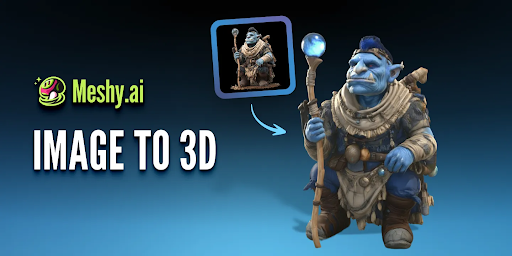
The quality of an early 3D draft depends partly on the reference. A clear image of one object gives the generation tool a more useful starting point than a crowded sketch with overlapping alternatives.
Teams should also decide what the model needs to communicate. If the aim is to compare two grinder shapes, the outline and proportions matter more than a photorealistic finish. If the discussion concerns a possible range of colors, the model needs a consistent shape that makes those variations easy to compare.
An image-to-3D tool such as Meshy can turn a sketch or reference image into an initial model for inspection. A designer can then rotate the result, compare it with the source and identify features that need correction.
The first output is a conversation starter. It should be reviewed as one.
A model may reproduce the front of a product convincingly while inventing details on the back. Handles, openings and joints deserve particular attention because a plausible-looking shape is not necessarily a usable one.
Use 3D Models to Make Better Decisions, Not Just Better Slides
A model is useful when it helps a team answer a specific question. Before a review, give participants a clear decision to make.
For example, a product team might compare two concepts for a reusable storage container. One has a wide opening and a low profile; the other is taller and takes up less shelf space. Rather than asking which image looks more appealing, the team can discuss how each shape affects filling, storage and presentation.
Record the result alongside the model: which concept was selected, what needs to change and which questions remain unanswered. That prevents an attractive visual from being mistaken for an approved design.
It also helps different departments contribute at the right stage. Marketing can flag whether the product’s main feature is visible, while engineering can identify details that need accurate dimensions or a more realistic construction.
Where AI-Generated Models Need More Work
AI-generated geometry is an approximation of the reference, not a set of manufacturing instructions. A model may need substantial editing before it is suitable for a specific business use.
For a visual presentation, the main concerns may be shape, surface appearance and whether the object looks consistent from different angles. For a digital product page, the model also needs to represent the item customers will actually receive. An inaccurate button, missing port or invented accessory can create confusion.
Engineering has a different standard. A team preparing a product for manufacture needs verified dimensions, material specifications, tolerances and functional tests. An AI-generated model should not be assumed to contain that information merely because it looks complete.
The same distinction applies to physical prototypes. A generated model may help communicate the intended form, but a usable prototype can require rebuilt geometry, measured parts and checks for wall thickness or fit.
How 3D Models Can Support Product Presentations
Once a design has been reviewed and refined, a 3D model can help explain it to people outside the development team.
A sales team might use a model to show how a product’s parts relate to one another. A retailer might review how an item will appear in a digital catalog. A marketing team could explore camera angles before commissioning final product imagery.
For online stores, interactive 3D models offer a different experience from a fixed photograph: shoppers can examine an object from multiple angles. Shopify’s product media guidance describes how merchants can use 3D models alongside other product media.
That does not make photography unnecessary. A model is useful for explaining form or demonstrating a concept, while photographs show the actual finished item. Businesses should choose the material that best answers the customer’s question—and make clear when an image represents a concept rather than a final product.
Keep the Digital Model Connected to the Product Record
As a product develops, its early visuals can become outdated. A concept model may show a handle that was removed, a label that changed or a finish that never reached production.
Give each model a clear version name and keep it with the relevant reference images and review notes. When the design changes, record whether the model has been updated to match. Before a model appears in a sales presentation or on a product page, compare it with the latest approved specifications.
This is especially important when different teams reuse the same asset. A visual that was appropriate for an internal concept meeting may be misleading in a customer-facing campaign months later.
A Faster Starting Point Still Needs Human Judgment
3D visualization can help businesses move from an abstract idea to a shared discussion. AI generation makes that first step more accessible, particularly when a team wants to examine a sketch from angles the original image does not show.
The practical value comes from the review that follows. Teams still need to decide whether the object makes sense, identify what the model cannot establish and involve the right people before using it for engineering, production or marketing.
A strong workflow treats the first model as evidence to examine—not as proof that the product is ready.
