

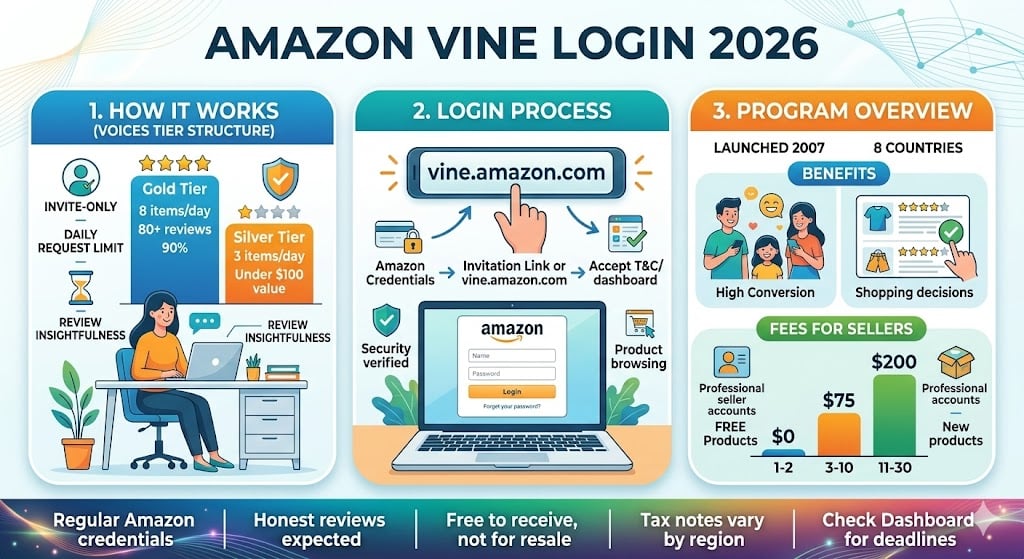
Amazon Vine is an invite-only review program where selected reviewers get free products in exchange for honest feedback. The Amazon Vine login uses your standard Amazon credentials — there is no separate account, no public application, and no shortcut. Access depends entirely on whether Amazon has flagged your account as eligible.
What the Amazon Vine Program Is
Amazon launched Vine in 2007. It operates in eight countries: the United States, Canada, the United Kingdom, France, Germany, Italy, Spain, and Japan. Reviewers accepted into the program — called Vine Voices — receive products at no cost and post detailed assessments in return. Those reviews carry a green “Vine Customer Review of Free Product” badge, which distinguishes them from organic feedback.
Three goals drive the program: helping shoppers make better purchasing decisions, giving new products early visibility on the platform, and keeping review quality high. You cannot apply. If Amazon’s internal algorithm finds your account worthy, an invite arrives by email. Amazon also factors in “helpful” votes from other customers when identifying candidates. As part of Amazon’s marketplace evolution since 1994, Vine has become one of its most closely guarded seller tools.
How the Amazon Vine Login Works
The Amazon Vine login does not require separate credentials. You sign in through your regular Amazon account using the same email and password. Only invited accounts can reach the Vine portal — everyone else gets redirected or sees an error page.
The basic process follows these steps:
- Go to Amazon’s website and sign in with your usual email and password.
- Open the Vine portal through your invitation link or the direct Vine URL at vine.amazon.com.
- Complete any security verification if prompted by Amazon’s two-step process.
- On your first visit, read and accept the program’s terms and conditions covering review expectations and tax obligations.
- Enter the dashboard and start browsing available products.
Mobile users sometimes encounter layout problems on the portal. A desktop browser generally works more reliably for reading terms, drafting reviews, or managing deadlines. Clearing your browser cache or switching to an incognito window resolves most authentication errors.
Vine Voices Tier Structure
In 2023, Amazon introduced two membership tiers for Vine Voices. In June 2025, Amazon also rolled out the Review Insightfulness Score — rated Poor, Fair, Good, or Excellent — which now factors into tier evaluations.
| Tier | Requirement | Daily Limit | Item Value Cap |
|---|---|---|---|
| Silver | Invite only | 3 items/day | Under $100 |
| Gold | 80+ reviews, 90% completion rate | 8 items/day | No cap |
Who Gets Access to the Amazon Vine Dashboard
Reviewers
Amazon looks at review quality, balanced ratings, purchase history, and long-term account activity — not just total review count. Writing consistently helpful, detailed reviews over time improves your odds. High volume alone will not earn an invite. No formal application exists.
Sellers
Sellers access the Amazon Vine portal through Seller Central under Advertising > Vine. Getting products into the program requires meeting a separate set of conditions. Per Amazon’s growth timeline, its third-party seller ecosystem now accounts for more than half of all units sold on the platform — making programs like Vine increasingly relevant for new product launches.
| Requirement | Detail |
|---|---|
| Account type | Professional Selling Account |
| Brand status | Brand Registry with Brand Representative role |
| Product condition | FBA, New only |
| Existing reviews | Fewer than 30 |
| Restricted items | No adult or hazardous products |
| Annual ASIN limit | Up to 200 |
| Reviews per product | Up to 30 Vine reviews per ASIN |
Amazon Vine Enrollment Fees for Sellers
Fees are charged per parent ASIN and billed seven days after the first Vine review publishes. The cost scales based on how many units are enrolled.
Inside the Amazon Vine Portal
Once logged in, the Amazon Vine dashboard has three main sections. “Available for You” lists products you can currently request. “Your Vine Items” tracks active shipments and review deadlines. The Reviews tab is where you write, edit, and submit feedback.
Missing review deadlines can lower your access tier or result in removal from the program entirely. Amazon expects honest assessments — positive, neutral, or negative — and does not allow sellers to edit or remove Vine reviews once published.
Costs and Tax Notes for Vine Voices
Vine products are free to receive but cannot be resold. In some countries, items received through the program count as taxable income under local tax law. The specific rules vary by region. Read the tax section inside the dashboard before accepting high-value items. Amazon does not cover any tax liability incurred by Vine Voices.
FAQs
Does the Amazon Vine login require a separate account or password?
No. The Amazon Vine login uses your standard Amazon account credentials. There is no separate username, password, or external website. Only invited accounts can access the Vine dashboard after signing in.
How do I get invited to the Amazon Vine program?
Amazon selects Vine Voices through an internal algorithm. It evaluates review quality, balanced ratings, purchase history, and account activity. There is no public application. Invitations arrive by email when Amazon’s system identifies your account as eligible.
Can sellers remove or edit Amazon Vine reviews?
No. Sellers cannot remove or edit Vine reviews. Amazon maintains review integrity by preventing any seller interference. Honest feedback — including criticism — stays on product listings permanently once published.
What happens if you miss a Vine review deadline?
Missing deadlines can reduce your access level or lead to removal from the program. Amazon monitors completion rates, and the Gold tier specifically requires a 90% completion rate to maintain eligibility.
Are Vine products taxable income?
In some countries, yes. Free products received through Amazon Vine may count as taxable income under local tax law. The rules vary by region. Review the tax section in your Vine dashboard before accepting high-value items.
